
AWS Security Checklist
https://spectacular-taiyaki-52bce4.netlify.app/
JOIN @h4ckerinthehouse FOR MORE! ✅
https://spectacular-taiyaki-52bce4.netlify.app/
JOIN @h4ckerinthehouse FOR MORE! ✅
❤8👍2🔥2
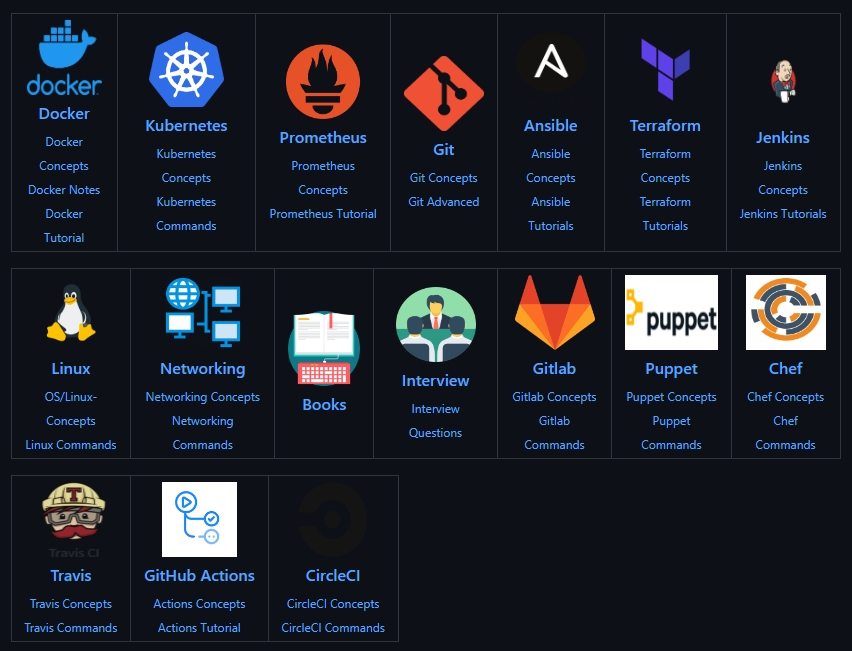
DevOps Guide
Development to Production all configurations with basic notes to debug efficiently.
https://github.com/Tikam02/DevOps-Guide
JOIN @h4ckerinthehouse FOR MORE! ✅
Development to Production all configurations with basic notes to debug efficiently.
https://github.com/Tikam02/DevOps-Guide
JOIN @h4ckerinthehouse FOR MORE! ✅
❤🔥3❤2👍2
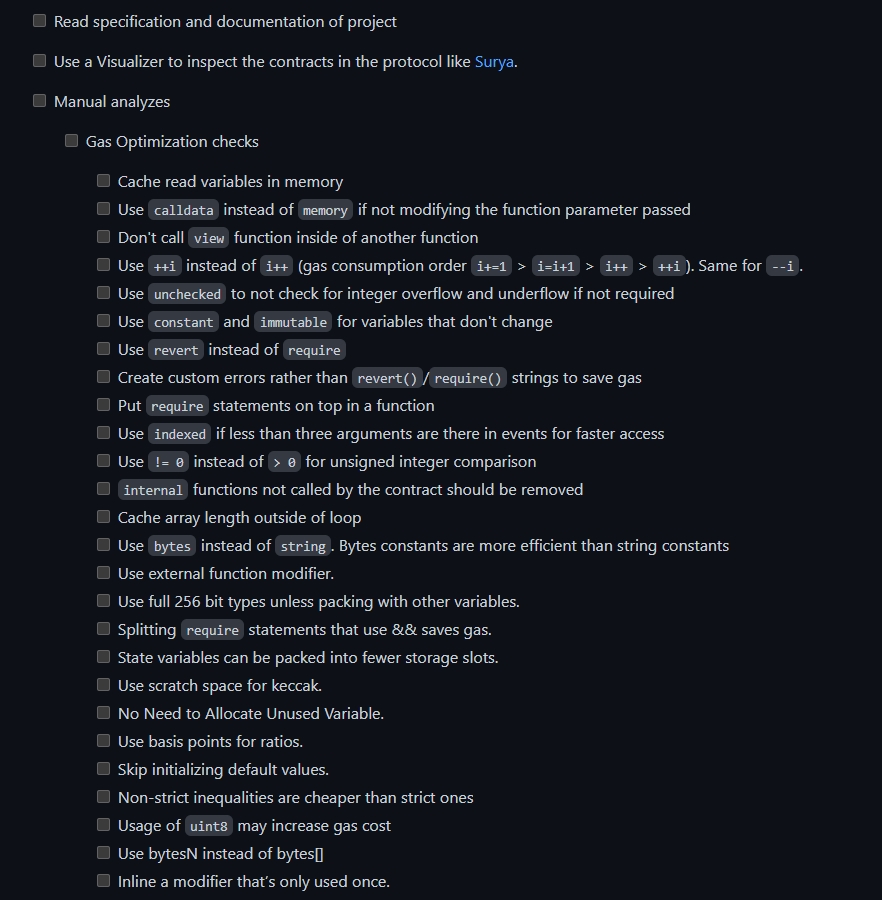
Smart Contract Auditing Checklist
https://github.com/vishnuram1999/Smart-Contract-Auditing-Checklist
JOIN @h4ckerinthehouse FOR MORE! ✅
https://github.com/vishnuram1999/Smart-Contract-Auditing-Checklist
JOIN @h4ckerinthehouse FOR MORE! ✅
❤2
Awesome Embedded and IoT Security
https://github.com/fkie-cad/awesome-embedded-and-iot-security
JOIN @h4ckerinthehouse FOR MORE! ✅
https://github.com/fkie-cad/awesome-embedded-and-iot-security
JOIN @h4ckerinthehouse FOR MORE! ✅
GitHub
GitHub - fkie-cad/awesome-embedded-and-iot-security: A curated list of awesome embedded and IoT security resources.
A curated list of awesome embedded and IoT security resources. - fkie-cad/awesome-embedded-and-iot-security
❤🔥3🔥2
NMAP CHEAT SHEET
#1 Nmap Basic Scanning
nmap -sV [host] // Version Detection, default scan
nmap -sS [host] // SYN Stealth Scan
nmap -sU [host] // UDP Scan
nmap -sT [host] // TCP Connect() Scan
nmap -sN [host] // TCP Null Scan
nmap -sF [host] // TCP FIN Scan
#2 Nmap Host Discovery
nmap -sL [host/network] // List Scan - Discover targets by querying DNS or the targets in a network
nmap -sn [host/network] // Ping Scan - Determine if hosts are alive
nmap -Pn [host/network] // Skip host discovery
#3 Nmap Port Scanning
nmap -sC [host] // Script Scan - Execute default nmap scripts
nmap -p [ports] [host] // Scan specific ports
nmap -F [host] // Fast Scan - Scan for the most commonly used ports
#4 Nmap Advertising Scanning
nmap -oA [filename] [host] // Output scan in all formats
nmap -O [host] // Probe Operating System fingerprints
nmap [host] --traceroute // Trace host hops
#5 Nmap Version Detection
nmap -sV [host] // Show versions of services and OS
nmap -A [host] // Advanced Scan - OS and service version and script scanning
nmap --script [name] [host] // Execute a custom script
#6 Nmap Timing Options
nmap -T[0-5] [host] // Timing for scans
#7 Nmap Firewall/IDS Evasion
nmap --spoof-mac [address] // Changes source MAC address
nmap -D RND:10 [host] // Decoy Scan - Appear to scan from multiple hosts
nmap -f // Fragmented Packets - Fragment Packets
nmap -Pn [host] // Skip host discovery
nmap --data-length [length] // Append random data to packet
JOIN @h4ckerinthehouse FOR MORE! ✅
#1 Nmap Basic Scanning
nmap -sV [host] // Version Detection, default scan
nmap -sS [host] // SYN Stealth Scan
nmap -sU [host] // UDP Scan
nmap -sT [host] // TCP Connect() Scan
nmap -sN [host] // TCP Null Scan
nmap -sF [host] // TCP FIN Scan
#2 Nmap Host Discovery
nmap -sL [host/network] // List Scan - Discover targets by querying DNS or the targets in a network
nmap -sn [host/network] // Ping Scan - Determine if hosts are alive
nmap -Pn [host/network] // Skip host discovery
#3 Nmap Port Scanning
nmap -sC [host] // Script Scan - Execute default nmap scripts
nmap -p [ports] [host] // Scan specific ports
nmap -F [host] // Fast Scan - Scan for the most commonly used ports
#4 Nmap Advertising Scanning
nmap -oA [filename] [host] // Output scan in all formats
nmap -O [host] // Probe Operating System fingerprints
nmap [host] --traceroute // Trace host hops
#5 Nmap Version Detection
nmap -sV [host] // Show versions of services and OS
nmap -A [host] // Advanced Scan - OS and service version and script scanning
nmap --script [name] [host] // Execute a custom script
#6 Nmap Timing Options
nmap -T[0-5] [host] // Timing for scans
#7 Nmap Firewall/IDS Evasion
nmap --spoof-mac [address] // Changes source MAC address
nmap -D RND:10 [host] // Decoy Scan - Appear to scan from multiple hosts
nmap -f // Fragmented Packets - Fragment Packets
nmap -Pn [host] // Skip host discovery
nmap --data-length [length] // Append random data to packet
JOIN @h4ckerinthehouse FOR MORE! ✅
🔥7❤3👍2
KALI LINUX CHEAT SHEET
1. Basic Commands:
- pwd: print working directory
- ls: list directory contents
- cd: change directory
- mkdir: creates a directory
- mv: moves a file
- cp: copies a file
- rm: removes a file
- cat: view contents of a file
- less: view contents of a file one page at a time
- more: view contents of a file one page at a time
- grep: search for text within files
- find: search for files
- chmod: change file/directory permissions
- man: view help/manual page for a command
2. Network and Security:
- ping: send ICMP echo request to host
- traceroute: show path of network hops
- netstat: show routing table and active connections
- nmap: Network Mapper (scanner)
- ifconfig: view/modify network interfaces
- tcpdump: capture network traffic
- wireshark: graphical network traffic analyzer
- arp: view arp table
- SSH: secure remote login
- WEP/WPA: wireless encryption protocols
- iptables: configure Linux firewall
- nessus: vulnerability scanner
3. System Administration:
- df: shows free/used disk space
- free: shows free/used system memory
- top: show running processes
- ps: show running processes
- uname: show system information
- uptime: show system uptime
- init: manage system run levels
- chown: change file/directory ownerships
- crontab: manage cron jobs
- useradd: add new user
- userdel: delete user
- groupadd: add new group
- groupdel: delete group
JOIN @h4ckerinthehouse FOR MORE! ✅
1. Basic Commands:
- pwd: print working directory
- ls: list directory contents
- cd: change directory
- mkdir: creates a directory
- mv: moves a file
- cp: copies a file
- rm: removes a file
- cat: view contents of a file
- less: view contents of a file one page at a time
- more: view contents of a file one page at a time
- grep: search for text within files
- find: search for files
- chmod: change file/directory permissions
- man: view help/manual page for a command
2. Network and Security:
- ping: send ICMP echo request to host
- traceroute: show path of network hops
- netstat: show routing table and active connections
- nmap: Network Mapper (scanner)
- ifconfig: view/modify network interfaces
- tcpdump: capture network traffic
- wireshark: graphical network traffic analyzer
- arp: view arp table
- SSH: secure remote login
- WEP/WPA: wireless encryption protocols
- iptables: configure Linux firewall
- nessus: vulnerability scanner
3. System Administration:
- df: shows free/used disk space
- free: shows free/used system memory
- top: show running processes
- ps: show running processes
- uname: show system information
- uptime: show system uptime
- init: manage system run levels
- chown: change file/directory ownerships
- crontab: manage cron jobs
- useradd: add new user
- userdel: delete user
- groupadd: add new group
- groupdel: delete group
JOIN @h4ckerinthehouse FOR MORE! ✅
👍9🔥2❤1❤🔥1
Some example dorks for finding vulnerable websites are:
1. inurl:index.php?id=
2. inurl:view_users.php?id=
3. inurl:products.php?id=
4. inurl:page.php?id=
5. “Powered by PHP-Fusion”
6. inurl:index.php?page_id=
7. inurl:/read.php?num=
8. inurl:/list_articles.php?id=
9. intitle:"index of" wp-content/plugins/
10. intitle:"index of" inurl:wp-content/uploads/
JOIN @h4ckerinthehouse FOR MORE! ✅
1. inurl:index.php?id=
2. inurl:view_users.php?id=
3. inurl:products.php?id=
4. inurl:page.php?id=
5. “Powered by PHP-Fusion”
6. inurl:index.php?page_id=
7. inurl:/read.php?num=
8. inurl:/list_articles.php?id=
9. intitle:"index of" wp-content/plugins/
10. intitle:"index of" inurl:wp-content/uploads/
JOIN @h4ckerinthehouse FOR MORE! ✅
🔥7👍4❤🔥1
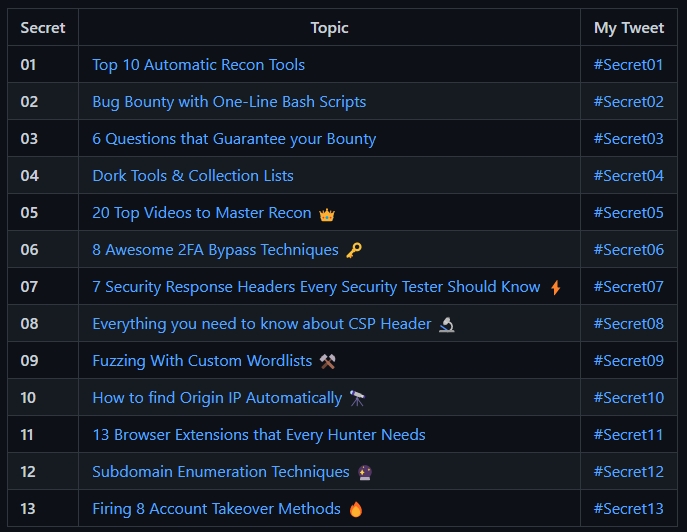
100 Bug Bounty Secrets
https://github.com/NafisiAslH/KnowledgeSharing/tree/main/CyberSecurity/Web/100BugBountySecrets
JOIN @h4ckerinthehouse FOR MORE! ✅
https://github.com/NafisiAslH/KnowledgeSharing/tree/main/CyberSecurity/Web/100BugBountySecrets
JOIN @h4ckerinthehouse FOR MORE! ✅
🔥4❤2❤🔥1
❤🔥6❤1
Catherine
The Catherine Framework is a general-purpose cybersecurity framework built to aggregate, validate, decode, decrypt, and maintain data. Catherine currently collects information from dumping hexadecimal content from files, validates malicious domains & IP addresses, attempts to crack unknown hashes, handles real-time database analysis, various types of decoding, and much more.
https://github.com/azazelm3dj3d/catherine
JOIN @h4ckerinthehouse FOR MORE! ✅
The Catherine Framework is a general-purpose cybersecurity framework built to aggregate, validate, decode, decrypt, and maintain data. Catherine currently collects information from dumping hexadecimal content from files, validates malicious domains & IP addresses, attempts to crack unknown hashes, handles real-time database analysis, various types of decoding, and much more.
https://github.com/azazelm3dj3d/catherine
JOIN @h4ckerinthehouse FOR MORE! ✅

❤1❤🔥1👍1
Metabigor
An Intelligence tool, its goal is to do #OSINT tasks and more but without any API key.
https://github.com/j3ssie/metabigor
JOIN @h4ckerinthehouse FOR MORE! ✅
An Intelligence tool, its goal is to do #OSINT tasks and more but without any API key.
https://github.com/j3ssie/metabigor
JOIN @h4ckerinthehouse FOR MORE! ✅
GitHub
GitHub - j3ssie/metabigor: OSINT tools and more but without API key
OSINT tools and more but without API key. Contribute to j3ssie/metabigor development by creating an account on GitHub.
❤🔥2👍1
MFASweep
MFASweep is a PowerShell script that attempts to log in to various Microsoft services using a provided set of credentials and will attempt to identify if MFA is enabled. Depending on how conditional access policies and other multi-factor authentication settings are configured some protocols may end up being left single factor. It also has an additional check for ADFS configurations and can attempt to log in to the on-prem ADFS server if detected.
https://github.com/dafthack/MFASweep
JOIN @h4ckerinthehouse FOR MORE! ✅
MFASweep is a PowerShell script that attempts to log in to various Microsoft services using a provided set of credentials and will attempt to identify if MFA is enabled. Depending on how conditional access policies and other multi-factor authentication settings are configured some protocols may end up being left single factor. It also has an additional check for ADFS configurations and can attempt to log in to the on-prem ADFS server if detected.
https://github.com/dafthack/MFASweep
JOIN @h4ckerinthehouse FOR MORE! ✅
🔥1
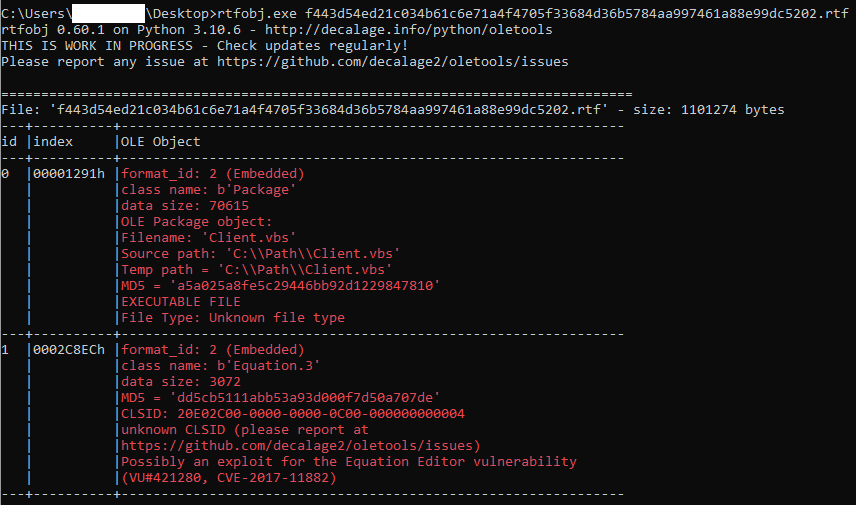
Malware Analysis
A repository to organize my malware write-ups that are too long or just don't work as Twitter threads.
https://github.com/dodo-sec/Malware-Analysis
JOIN @h4ckerinthehouse FOR MORE! ✅
A repository to organize my malware write-ups that are too long or just don't work as Twitter threads.
https://github.com/dodo-sec/Malware-Analysis
JOIN @h4ckerinthehouse FOR MORE! ✅
❤1🔥1
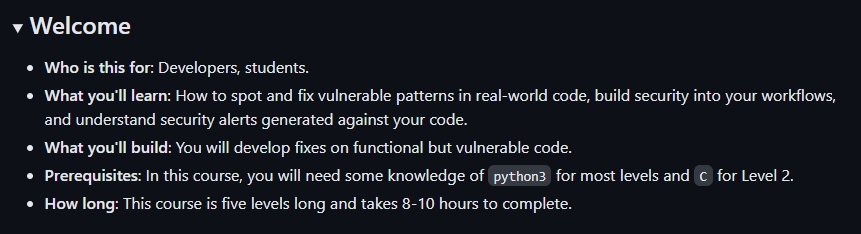
Secure Code Game
A GitHub Security Lab initiative, providing an in-repo learning experience, where learners secure intentionally vulnerable code.
https://github.com/manaver/codeGame
JOIN @h4ckerinthehouse FOR MORE! ✅
A GitHub Security Lab initiative, providing an in-repo learning experience, where learners secure intentionally vulnerable code.
https://github.com/manaver/codeGame
JOIN @h4ckerinthehouse FOR MORE! ✅
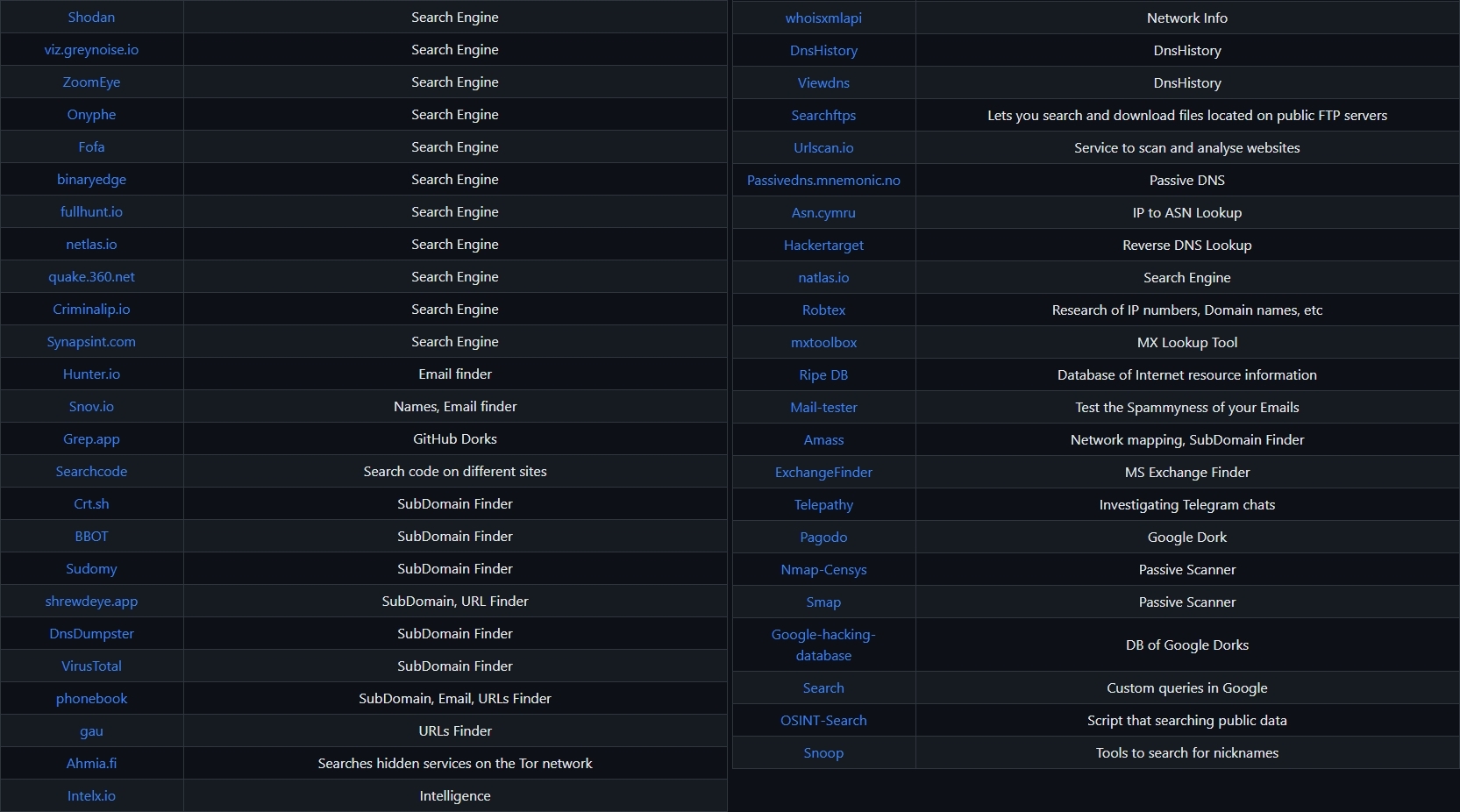
#OSINT Tools
This github repository contains links/tools that a cybersec specialist can use in his work. Some of the sites included might require registration or offer more data for $$$, but you should be able to get at least a portion of the available information for no cost.
https://github.com/wddadk/OSINT-Tools
JOIN @h4ckerinthehouse FOR MORE! ✅
This github repository contains links/tools that a cybersec specialist can use in his work. Some of the sites included might require registration or offer more data for $$$, but you should be able to get at least a portion of the available information for no cost.
https://github.com/wddadk/OSINT-Tools
JOIN @h4ckerinthehouse FOR MORE! ✅
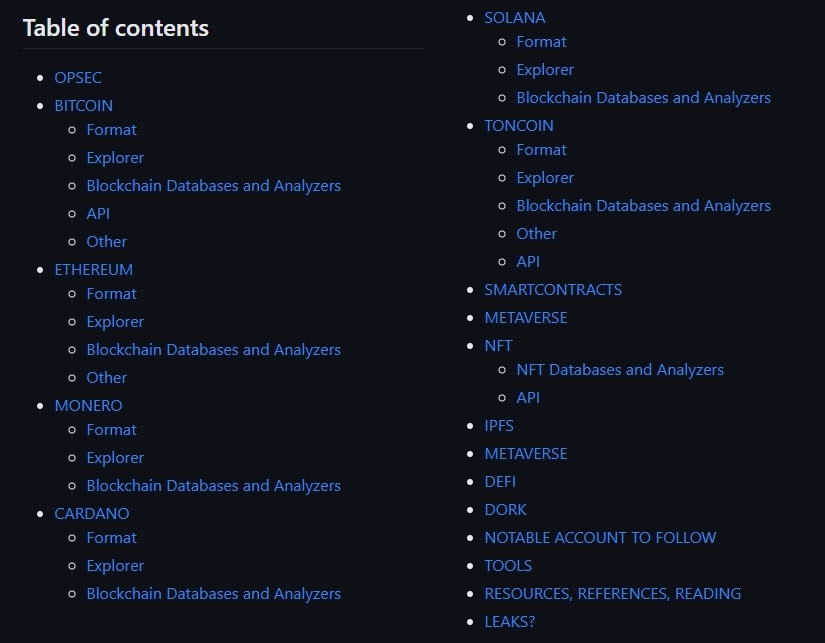
Crypto #OSINT investigation
A collection of resources useful for OSINT Investigations on Cryptocurrencies and WEB3. For sure, it isn't a complete resource, most of what you find here is related to some investigation I did. Feel free to fork and make any addition you want.
https://github.com/aaarghhh/awesome_osint_criypto_web3_stuff
JOIN @h4ckerinthehouse FOR MORE! ✅
A collection of resources useful for OSINT Investigations on Cryptocurrencies and WEB3. For sure, it isn't a complete resource, most of what you find here is related to some investigation I did. Feel free to fork and make any addition you want.
https://github.com/aaarghhh/awesome_osint_criypto_web3_stuff
JOIN @h4ckerinthehouse FOR MORE! ✅
🔥2❤1
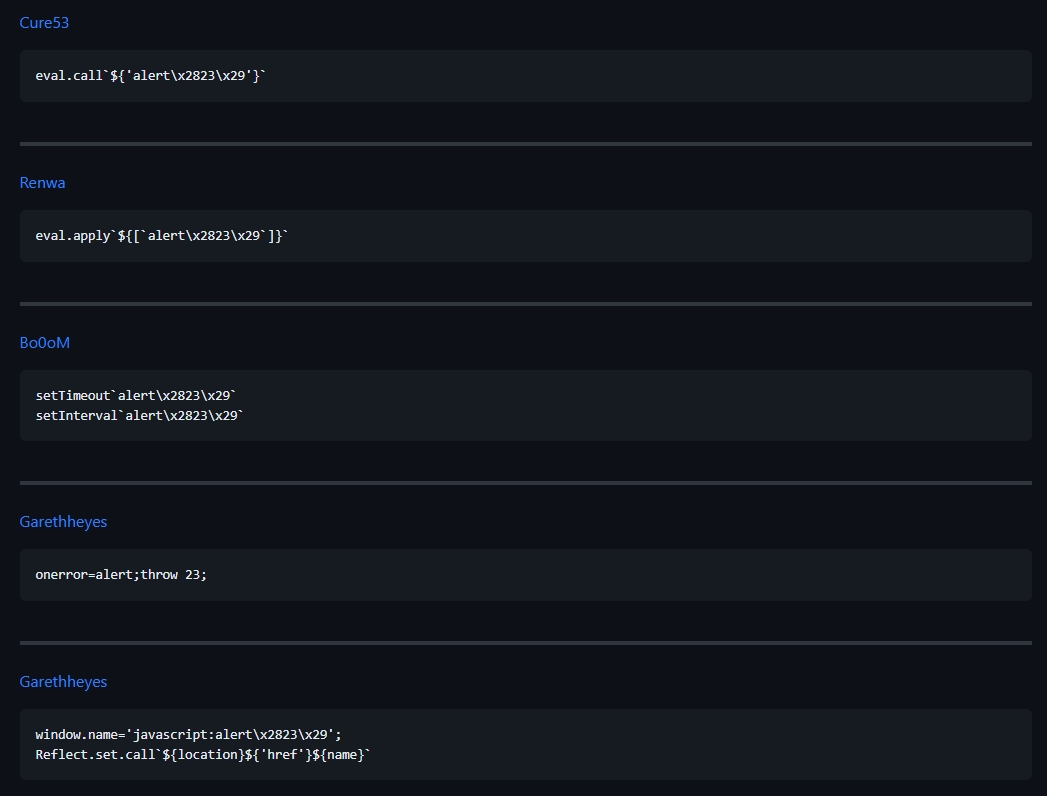
XSS-Payloads
List of XSS Vectors/Payloads i have been collecting since 2015 from different resources like websites, tweets, books... You can use them to bypass WAF and find XSS vulnerabilities, i will try to update the list as possible.
https://github.com/RenwaX23/XSS-Payloads/blob/master/Without-Parentheses.md
#infosec #bugbounty #pentesting
List of XSS Vectors/Payloads i have been collecting since 2015 from different resources like websites, tweets, books... You can use them to bypass WAF and find XSS vulnerabilities, i will try to update the list as possible.
https://github.com/RenwaX23/XSS-Payloads/blob/master/Without-Parentheses.md
#infosec #bugbounty #pentesting
❤🔥3